Overview
An MCP server (Model Context Protocol) is a bridge from a large language model (LLM) such as Claude Code or Google Gemini CLI to external services. This makes it possible, to access data from these external services or control these external services from within an LLM.
Virtual Smart Home™ offers an MCP server for the URL Routine Trigger Alexa skill. This allows you to launch Alexa routines from your favourite LLM.
Please note that this MCP server is available as a goodie for URL Routine Trigger contributors only.
Disclaimer
The MCP server and any related software are provided as-is by Virtual Smart Home™. Use at your own risk. Virtual Smart Home™ makes no warranties regarding the reliability, accuracy, or completeness of this tool. You are solely responsible for how you use it and for any actions performed through it. Always review tool actions before executing them in production environments.
Get your MCP token
You need an ‘URL Routine Trigger MCP token’ for accessing URL Routine Trigger through the MCP server:
- Log in to your URL Routine Trigger.
- Make sure you are a contributor, which is indicated in the top-right corner of the menu bar.

- Click on your profile icon in the top-right corner and select ‘Use MCP server’.
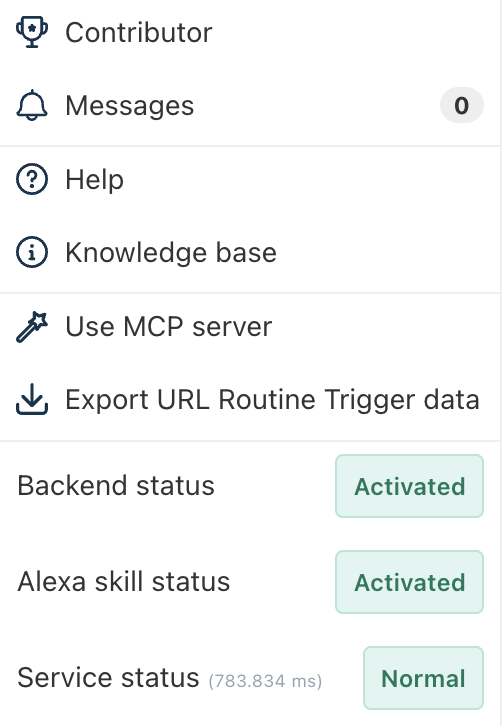
- Your MCP token is displayed in a separate window. The format of the MCP token is as follows: xyz.virtualsmarthome.url_routine_trigger.12abdc34-b12c-123e-9876-123e0f1234d5.69d089c4-2cba-432a-aa12-a78901020304 (This is only a dummy token that cannot be used for production purposes.)
- Copy the MCP token and store it for later use.
Please note that MCP tokens are available for URL Routine Trigger contributors only.
Install the MCP server
Prerequisites
To use the MCP server for URL Routine Trigger, these requirements have to be met:
- Node.js installed
- A valid MCP token for the URL Routine Trigger (see above)
Setup and installation
Download the MCP server for the URL Routine Trigger.
Navigate to the main directory, in which the file package.json is located:
cd url_routine_trigger_mcpInstall dependencies:
npm install
Build the MCP server:
npm run build
If you would like to test the MCP server manually, navigate to the main directory, in which file package.json is located. To run the server manually for testing:
export URL_ROUTINE_TRIGGER_MCP_TOKEN=your_mcp_token
npm start
Please note that you do not have to run the MCP server manually for productive use. This is only for testing.
Configure your LLM
Add the following to the configuration of your favourite LLM (e.g., ~/.gemini/settings.json for Gemini CLI):
{
  "mcpServers": {
    "url-routine-trigger": {
      "command": "node",
      "args": ["/absolute/path/to/url_routine_trigger_mcp/build/index.js"],
      "env": {
        "URL_ROUTINE_TRIGGER_MCP_TOKEN": "your_mcp_token"
      }
    }
  }
}
When you run your LLM, you can check if the MCP server for the URL Routine Trigger Alexa skill was added successfully. In Claude Code and Google Gemini CLI, for instance, you can use the following command:
/mcp list
You should see the tools provided by the URL Routine Trigger MCP server now.
Available MCP tools
| Tool name | Description | Parameters |
|---|---|---|
| url_routine_trigger_list | List all URL Routine Triggers | None |
| url_routine_trigger_create | Create a new URL Routine Trigger | triggerName (String) |
| url_routine_trigger_update | Change the name of an existing URL Routine Trigger | triggerId (String), triggerName (String) |
| url_routine_trigger_delete | Delete an existing URL Routine Trigger | triggerId (String) |
| url_routine_trigger_activate | Activate an existing URL Routine Trigger | trigger (triggerID or triggerName) (String), token (String) |
Examples
List all URL Routine Triggers Triggers:
- User: ‘Show me my URL Routine Triggers.’
- The AI will call url_routine_trigger_list() and display the triggers.
Create a new URL Routine Trigger:
- User: ‘Create a new trigger called “Movie Night”’
- The AI will call url_routine_trigger_create({ triggerName: "Movie Night" }) to create a new trigger.
Activate and existing trigger
- User: ‘Activate my “Movie Night” trigger.’
- The AI will first list triggers to find the security token for ‘Movie Night’, then call: url_routine_trigger_activate({ trigger: "trigger_id", token: "security_token" }) to activate the trigger.
Was this article helpful?
That’s Great!
Thank you for your feedback
Sorry! We couldn't be helpful
Thank you for your feedback
Feedback sent
We appreciate your effort and will try to fix the article